Mobs Maker for Minecraft PE
- 3.2
- Rating
- 500.00K
- Installs
- Free
- Price
 Analysis by App-foxy
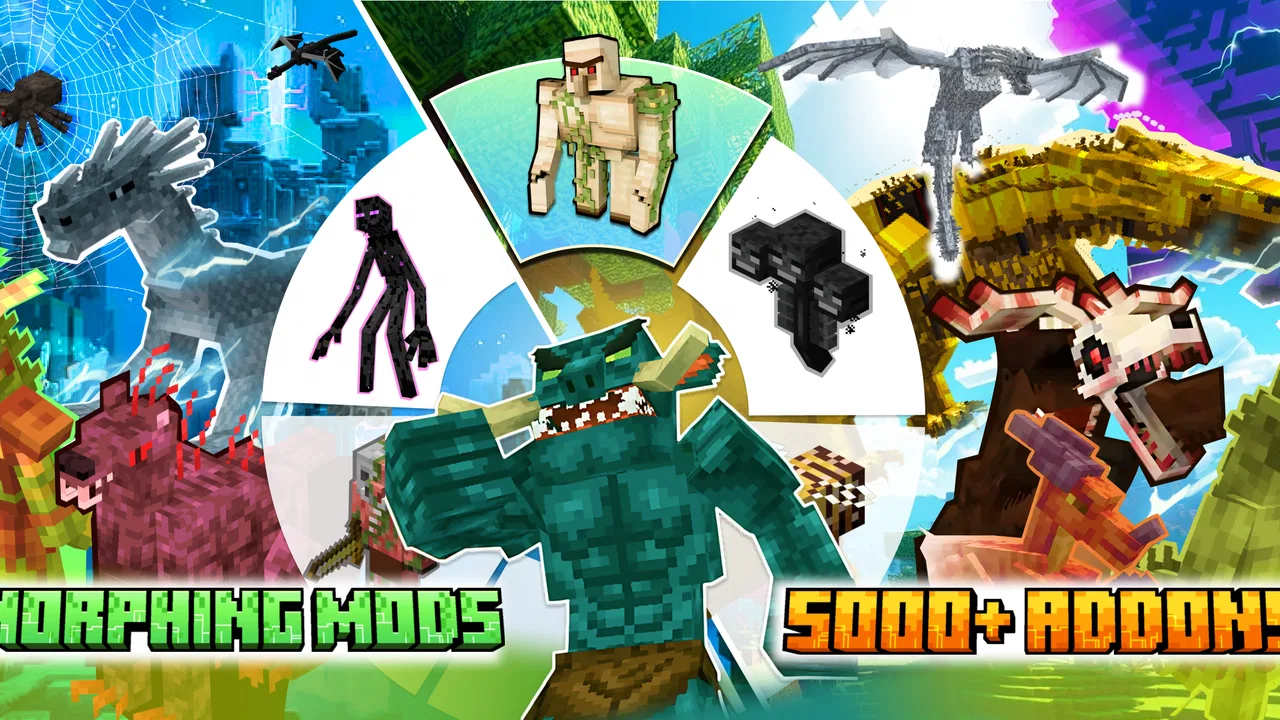
Creating a custom Minecraft PE mob sounds simple until the work moves beyond a basic idea. A creature needs a model, a recognizable shape, suitable textures, and a workflow that does not become frustrating on a small screen. Mobs Maker for Minecraft PE is aimed at that specific gap: it connects Minecraft creators with Blockbench-based mob creation rather than trying to be a general-purpose game or a broad 3D design suite. I found it most interesting as a starting point for people who want to experiment with custom creatures but are not ready to build an entire add-on workflow from scratch.
The app comes from JoyCraft Studio and sits in the Libraries & Demo section of Android apps. It is free to install, with optional purchases priced at $3.49 per item. Its Teen content rating makes sense for a tool connected to Minecraft creation rather than a children-only drawing toy. The current version is 1.3.8, and it runs on Android 7.0 or later, so the basic device requirement is not especially demanding.
My overall impression is mixed but useful: this is a focused helper for MCPE creators, not a polished replacement for every desktop modeling tool. It can make the first steps feel more approachable, especially when I want to sketch out a mob concept away from a computer. At the same time, the experience depends heavily on how comfortable I am with visual editing, small controls, and the wider Blockbench process. That distinction matters more than the short store description suggests.
You May Also Like

 Blood Strike: 2.5 Anniversary
Blood Strike’s Loadouts Turn Every Drop Into a Tactical Gamble
A close look at Blood Strike’s custom loadouts: how fast access to signature weapons reshapes its battle royale rhythm, rewards preparation, and narrows the gap between fights.

 Pandora - Music & Podcasts
Pandora’s Music Is Easy to Start, but Harder to Recover
Pandora’s strength is its low-effort path from a seed to a station. Its weak spot is how much confidence it asks you to place in connection, setup, and quiet recovery.

 8 Ball Pool
 Is Built on Rivalries, Rematches, and Routine
A close look at the rivalries, rematches, shared routines, and unanswered safety questions that turn a quick pool match into a persistent mobile community.

 Samsung Music
’s Quiet Strength Is Playing What You Already Own
Its reach comes less from spectacle than from dependable access to a personal library. That simplicity is both the app’s strongest retention engine and its ceiling.

 AccuWeather: Weather Radar
AccuWeather Review: A Quick, Clear Forecast for Everyday Decisions
For everyday plans, the best forecast is the one you can understand quickly. AccuWeather makes rain timing, radar, and local conditions easy to act on, with a few trade-offs.

 Hill Climb Racing
Why Hill Climb Racing Still Turns Crashes Into One More Run
A tiny car, a bumpy hill and one more upgrade: Hill Climb Racing keeps resurfacing because its simple chaos makes every near-miss feel personal.
More From Our News Desk



How the interface feels when I am trying to create
When I’m trying to create, the interface matters as much as the mob idea: small controls and a crowded preview can turn simple adjustments into guesswork. I’d begin by checking whether I can select and inspect model parts comfortably on my device, then keep the first session focused on one shape decision. That makes it easier to tell whether the mobile workflow suits me before I invest more time.
Readability and navigation on a phone
The biggest advantage of a mobile mob-making tool is immediacy. I can open it when an idea occurs instead of waiting until I am back at a desktop. For someone who already understands the basic logic of Minecraft models, that direct access can be genuinely helpful. I can think in terms of body parts, proportions, and the visual identity of a creature rather than starting with a blank general-purpose art program.
That focus also limits what the app needs to communicate. A creator is not searching through a large library of unrelated editing functions; the purpose is centered on making mobs with Blockbench. In practice, that kind of narrower scope is easier to understand than a full 3D package filled with tools I may never use. New users still need patience, because modeling vocabulary and the relationship between a model and its texture are not automatically obvious just because the app is mobile.
On a phone, readability depends on the display and on how much visual information is shown at once. Small labels, compact buttons, and a model preview competing for space can make a detailed task tiring. I would recommend increasing system text size only if it does not make controls overlap, then testing the layout before beginning a serious project. If a larger font makes the interface less usable, keeping the default size and using a larger screen may be the better compromise.
I also found that navigation is easier when I approach the app with a plan. Before opening a project, I decide whether I am designing the creature’s silhouette, working on its surface appearance, or preparing it for use in a Minecraft creation workflow. Switching goals repeatedly is where a focused mobile editor can start to feel cramped. A short, deliberate session is more comfortable than trying to complete every stage in one sitting.
Why Blockbench knowledge changes the experience
The connection with Blockbench is important. This is not simply a character-drawing app where I can paint an image and expect a finished Minecraft creature to appear. The useful mental model is closer to constructing a low-poly object from separate parts, then making sure the visual result fits the intended Minecraft style. Anyone familiar with Blockbench will probably understand the app’s purpose faster than someone who has only played Minecraft.
For a beginner, I would start with a deliberately simple mob: a body, a head, and one distinctive feature. That approach reduces the number of decisions on screen and makes it easier to notice whether the proportions look right. A creature with too many thin limbs, overlapping parts, or tiny decorative elements may be harder to edit on a phone than on a computer. Starting small is not merely a learning exercise; it is a practical way to reduce visual clutter and hand movement.
One useful workflow is to treat the first version as a paper sketch in 3D. I focus on the outline and the way the mob reads from a distance before worrying about details. Minecraft-style designs benefit from a clear silhouette, and a phone screen makes that especially important. If the creature is recognizable only when zoomed in, I know I have spent effort in the wrong order.
Another helpful habit is to save or review stages rather than constantly changing everything at once. I can make a rough body, inspect it, then work on the head and texture separately. This makes mistakes easier to identify. It also helps users who become overwhelmed by a large set of simultaneous visual choices, because each session has one concrete purpose.
Motor demands and sensory comfort
Mobile 3D editing asks for more precision than ordinary tapping. Dragging, rotating, zooming, and selecting small model areas can be difficult for users with limited fine-motor control, hand tremors, joint pain, or fatigue. I would not describe the app as automatically accessible simply because it runs on a touchscreen. The input method itself creates a barrier, particularly when a small movement can rotate a model instead of selecting the intended part.
A stylus may help some users, while others will prefer a larger tablet and a stable surface. Neither option changes the app’s controls, but both can reduce the need for highly precise finger movements. I would also work in short sessions and pause after a few modeling steps. The benefit is not only comfort: fatigue makes accidental rotations and misplaced edits more likely, which can turn a manageable project into an irritating one.
Sensory comfort is equally personal. A busy model preview, repeated zooming, and constant changes in orientation can be tiring for people who are sensitive to motion or visual complexity. I would keep the design simple during the planning stage and avoid adding decorative details until the body shape is settled. This creates a calmer visual workload and makes it easier to judge the mob’s structure.
For users who rely on spoken guidance, magnification, switch access, or other Android assistance tools, the practical result may vary by device and system settings. I would test the app with those tools before committing to a long project, especially if selecting small controls is already difficult in other creative apps. The most honest way to approach it is as a visually driven editor whose suitability depends on the person, the screen, and the input method.
Situational access: when the mobile format helps
The strongest use case is a creator who has an idea while away from a computer. Imagine planning a Minecraft world during a commute or during a break, then wanting to shape a creature before the idea disappears. A phone-based tool can be valuable in that moment. I can block out the mob’s proportions, explore whether its head or limbs communicate the intended role, and return to the project later instead of relying on memory.
It can also suit students or hobbyists who share a device with family members and do not always have access to a desktop. A free starting point lowers the risk of trying the hobby. The app’s audience is not limited to experienced add-on creators; it can serve someone who wants to understand how custom Minecraft creatures are assembled before investing in more advanced software or equipment.
However, the mobile format is not automatically better for every context. A creator working on a large add-on, comparing many versions, or needing precise control over a complex model may be more productive with the usual desktop Blockbench experience. A larger screen gives more room for the model, controls, and reference material at the same time. I see the mobile app as a convenient entry point and companion, not a universal replacement for desktop creation.
It may also be useful for collaborative planning. One person can use the app to create a visual concept, then show the result to a friend or team before spending time on a larger project. That is a practical way to settle questions about shape and style early. It is better to discover that a creature looks too similar to an existing mob at the concept stage than after building a complete add-on around it.
Trade-offs around cost and commitment
The free price makes experimentation easier. I can try the workflow without treating the first attempt as a financial commitment. Optional purchases at $3.49 per item may be acceptable for users who find the app useful, but I would still begin with a small project and decide whether the controls suit me before buying anything. A paid item cannot solve a basic mismatch between touchscreen editing and my preferred way of working.
The app has reached over 500 thousand installs and holds a 3.6 average from around 1.7 thousand ratings. Those figures suggest a real audience, but they also point to a product that will not satisfy every creator equally. I would interpret the rating as a reason to keep expectations realistic: the concept is appealing, while the hands-on experience can depend on device size, prior Blockbench knowledge, and tolerance for mobile precision work.
JoyCraft Studio has kept the app focused on the mob-making idea rather than presenting it as a complete Minecraft development environment. That focus is helpful when I want a direct creative task, but it means I should not expect the same breadth as a full desktop tool. The app’s value comes from reducing the distance between an idea and a first model, not from eliminating every later step in a creator’s workflow.
Remaining barriers before a project is finished
The first barrier is the learning curve hidden behind the simple premise. “Make a mob” covers several separate skills: visual planning, model construction, texture decisions, and understanding how the result fits into Minecraft PE content. If I am new to all of those areas, the app can feel less like a one-tap generator and more like an introduction to a small design discipline.
The second barrier is precision. Touchscreens are comfortable for browsing and casual drawing, but detailed 3D editing can expose their weaknesses. A user with large fingers may select the wrong part; a user with limited movement may struggle with repeated gestures; and anyone working on a small phone may find the preview too restrictive. These are not reasons to dismiss the app, but they are strong reasons to test a basic model before planning an ambitious creature.
The third barrier is workflow continuity. If I begin on the phone and finish elsewhere, I need to be organized about project files and the next stage of creation. I would name versions clearly, keep a simple written note about what remains to be done, and avoid assuming that a visually finished model is automatically ready for Minecraft PE. That small amount of preparation prevents confusion when returning to the project later.
There is also a creative limitation in starting from a mobile interface: it encourages quick experimentation, but quick experimentation can lead to shallow designs if I never stop to check proportions and readability. I get better results when I alternate between making changes and viewing the mob as a player would see it. The creature should still communicate its identity when it is not filling the entire screen.
Who should use it, and who should choose another route?
I would recommend Mobs Maker to Minecraft PE players who want to learn custom mob creation, hobbyists who need a portable modeling option, and creators who prefer building a rough concept before moving to a larger workflow. It is especially suitable for people who enjoy visual experimentation and are comfortable learning through trial and error. A simple first creature can provide a useful introduction without demanding a complete professional setup.
I would be more cautious if precise motor control is difficult, if visual motion causes discomfort, or if the user needs a highly efficient production environment. In those cases, a desktop Blockbench setup with a larger display and more deliberate input may be a better primary choice. Someone looking only for ready-made mobs should also look elsewhere, because the appeal here is creation rather than passive browsing.
Parents should remember that the content rating is Teen, even though the app is connected to a familiar game. I would consider the individual child’s ability to handle creative software, online Minecraft-related content in general, and in-app purchasing decisions rather than assuming that the game connection makes the tool suitable for everyone.
My inclusive verdict
After using it as a mobile creation tool, I see Mobs Maker for Minecraft PE as a practical doorway into custom mob design, with accessibility that depends more on context than on a single promise. The focused purpose is easier to approach than a full 3D suite, and the free entry point makes experimentation less intimidating. For users with a larger screen, a stylus, or strong familiarity with Blockbench, the experience can be noticeably more comfortable.
Its limitations are just as important. Small touchscreen controls, visual complexity, and the need to understand the broader Minecraft creation process can exclude users who need highly precise or low-effort interaction. I would not choose it for a demanding production pipeline without testing it first. I would choose it for sketching, learning, and turning a creature idea into something tangible while away from a computer.
My recommendation is to start with one uncomplicated mob and judge the workflow by comfort, not by ambition. If the model preview is readable, the gestures feel manageable, and the Blockbench connection matches the way you like to create, this app can become a useful part of your Minecraft PE toolkit. If those basics already feel tiring, a larger-screen alternative will probably serve you better. That honest trial is the best measure of whether this particular mobile editor belongs in your creative routine.
FAQs for Mobs Maker for Minecraft PE
01What is Mobs Maker for Minecraft PE?
Mobs Maker for Minecraft PE is a user-friendly application that allows players to create custom mobs for their Minecraft Pocket Edition worlds. With an intuitive interface, users can design unique creatures by modifying existing templates or creating new ones from scratch. It's a tool designed for both beginners and seasoned Minecraft enthusiasts.
02Is Mobs Maker for Minecraft PE compatible with all devices?
Mobs Maker for Minecraft PE is compatible with most Android and iOS devices that support Minecraft Pocket Edition. However, it's important to ensure your device has adequate storage and processing capabilities to handle the app's features smoothly. Checking for the latest version of the app and your device's operating system is recommended for optimal performance.
03Does Mobs Maker for Minecraft PE require an internet connection?
While Mobs Maker for Minecraft PE can be used offline to create and modify mobs, an internet connection is required to download updates or share creations with the community. Additionally, accessing certain features, such as downloading templates or uploading your designs, may require a stable internet connection.
04Are there in-app purchases in Mobs Maker for Minecraft PE?
Yes, Mobs Maker for Minecraft PE offers in-app purchases. These may include premium templates, additional design tools, or the removal of ads. While the app provides a basic set of features for free, purchasing these extras can enhance your creative experience and provide access to exclusive content.
05Is Mobs Maker for Minecraft PE safe for children to use?
Mobs Maker for Minecraft PE is generally safe for children, as it focuses on creativity and learning through design. Parents should be aware of the app's community-sharing features, which may expose children to user-generated content. It's advisable for parents to supervise usage and review any in-app purchases to ensure a safe experience.
Pros
- User-friendly interface for easy navigation.
- Wide variety of customization options.
- Regular updates with new features.
- Seamless integration with Minecraft PE.
- Supports multiple languages for accessibility.
Cons
- Limited free features; some require purchase.
- Occasional bugs during mob editing.
- Requires internet for some functionalities.
- Ads can be intrusive at times.
- Lacks tutorial for first-time users.

Mobs Maker for Minecraft PE
Gallery